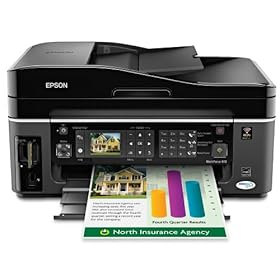
Epson WorkForce 610 Color Inkjet All-In-One Printer

This remarkable product manages to print documents up to two-times faster than leading color inkjet alternatives from competitive companies...

Activate Account Administrator di Windows 7 dan Vista : > "Run as administrator"...

HOW TO COPE VIRUS SHORTCUT 1234 RUNMIT

The characteristics of affected Virus 1234 Shortcut: 1. Shortcut Virus 1234 Runmit WATERMARK.EXE this will make the existing file in two places, namely:...

HOW TO SOLVE ERROR C000 ON CANON PIXMA MX870

How to solve error C000 on Canon Pixma MX870 Solution 1: Switch off the printer Disconnect the power cable Open door: ....

SPESIFIKASI TOSHIBA SATELLITE L645-1147XB

Spesifikasi Laptop Toshiba Satellite L645-1147XB O/S: Microsoft Windows 7 Home Premium Processor: Intel® Core™ i5-480M Processor (2.67 GHz, Cache 3 MB). Chipset: Intel HM55. Memory: 2 GB DDR3 SODIMM PC-8500, Max. Memory 8 GB (2 DIMMs) Graphics Engine: ATI Mobility Radeon HD 5470 512 MB...

Monday, January 17, 2011

Solusi Error E16 Canon MP258


Indicator:
Error E16 Canon MP258 or show this pict :


Solusi:
Thursday, January 13, 2011

How To Service Epson R210 / R230 Ink and Resume Led Blinking Rapidly

Discussion this time is about the Epson R210 and R230 printers that the Resume and Ink Led blinking rapidly. This damage often occurs, and hopefully with this article easier for you all ....


How To Service Epson R210 / R230 Ink and Resume Led Blinking Rapidly :

Early indications:
When the printer is turned on, the printer will look normal and do the calibration with head movement to the right and left on a regular basis. But at the end of the printer calibration, printer process stopped completely with ink indicator led and resume led (which the paper symbol) flashing blinking rapidly.

Cause:
Epson R210 / R230 Ink and Resume Led Blinking Rapidly, this is caused by the closing of the sensor under the head by the ink overflow, and eventually the printer will protect themselves by stop completely.


Service Solutions Epson R210 / R230 Ink and Resume Led Blinking Rapidly :

1. Open the case Epson R210 / R230.

2. Take Head printer and see the bottom, there you will find a small sensor which is normally closed / submerged ink.


3. Clean this sensor.

4. If the problem still the same, Ink and Resume Led R210 / R230 still blinking fast, then you should replace the sensor and cable.

5. Completed and the printer is ready to try .....

Good luck .....

Related Posts Plugin for WordPress, Blogger...